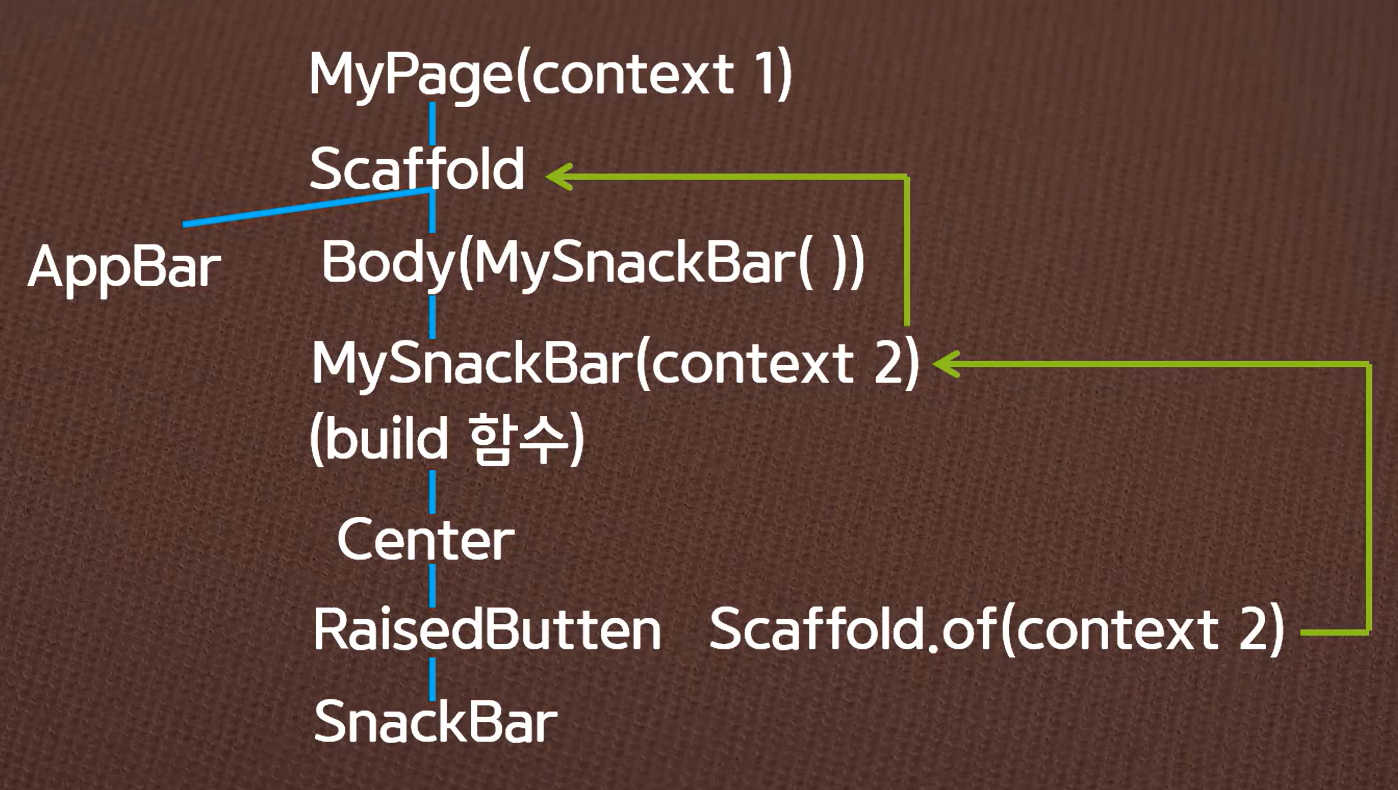
flutter 3.16버전에서는 RaisedButton이 아닌 ElevatedButton 사용
import 'package:flutter/material.dart';

void main() {
  runApp(const MyApp());
}

class MyApp extends StatelessWidget {
  const MyApp({super.key});

  @override
  Widget build(BuildContext context) {
    return MaterialApp(
      debugShowCheckedModeBanner: false,
      theme: ThemeData(
        primarySwatch: Colors.pink,
        useMaterial3: false,
      ),
      home: const Mypage(),
    );
  }
}

class Mypage extends StatelessWidget {
  const Mypage({super.key});

  @override
  Widget build(BuildContext context) {
    return Scaffold(
      appBar: AppBar(
        title: Text('Snack Bar'),
        centerTitle: true,
      ),
      body: MySnackBar(),
    );
  }
}

class MySnackBar extends StatelessWidget {
  const MySnackBar({super.key});

  @override
  Widget build(BuildContext context) {
    return Center(
      child: ElevatedButton(
        child: Text('show me'),
        onPressed: (){
          ScaffoldMessenger.of(context).showSnackBar(
              SnackBar(
                  content: Text('Hello',
                  textAlign: TextAlign.center,
                    style: TextStyle(
                      color: Colors.white
                    ),
                  ),
                backgroundColor: Colors.teal,
                duration: Duration(seconds: 1),
              ),
          );
        },
      ),
    );
  }
}

'flutter' 카테고리의 다른 글
| [flutter] Container widget (0) | 2024.01.22 |
|---|---|
| [flutter] toastMessage (0) | 2024.01.21 |
| [flutter] SnackBar (0) | 2024.01.21 |
| [flutter] BuildContext란? (0) | 2024.01.21 |
| [flutter] appbar에 menu 아이콘 추가하기 (0) | 2024.01.14 |


